 Car insurance
 Telematics
 Van insurance
 Home insurance
 Car finance



inside marshmallow
10 Questions with Charlie: Marshmallow Backend Engineer
Meet Charlie, the Backend Engineer of our Efficiency team. Discover his role and expertise as we ask him 10 quick-fire questions.
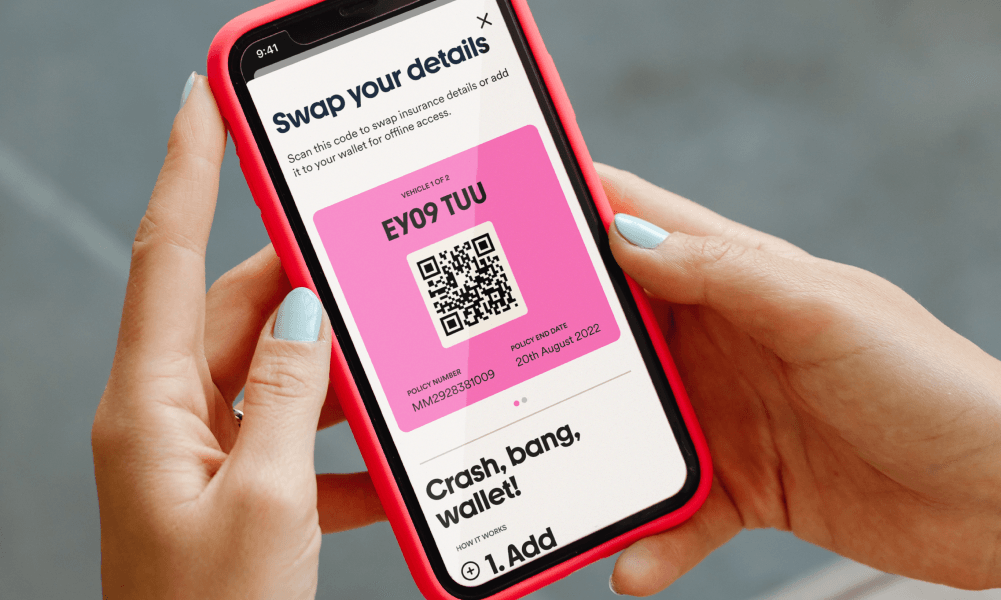

Bump! Is our latest feature, and the best way to exchange information after an accident. It’s here to take as much of the stress out of a crash as possible.
Let’s make making a claim less terrifying.
Let’s say unfortunately you’re in an accident, the last thing you want to be doing is googling all 15 bits of information you might need to collect in order to make a valid claim.
Actually, according to our research, you’re more likely to get on the phone to a loved one than think practically about next steps. You’re only human.
Bump! allows you to swap information with the other party effectively and easily.
Bump! = Easy info for your claim
If you’ve got a policy with us, it’s pretty easy.
You’ll see a notification on your Marshmallow app dashboard that will take you to your options:
If you’re one of those really practical people who download their boarding pass to their phone’s digital wallet, this route is for you (if not scroll to Route B):
Add: You’ll see a prompt on your Home tab to add your Bump! card to your digital wallet.
Scan: After an accident, you’ll pull your Bump! Card up in your phone’s digital wallet and ask the other party to scan the QR code with their phone camera.
Swap: They’ll be prompted to enter all the details needed.
Sorted: You’ll both get a text with each other’s details. And we’ll be in touch to sort your claim
If the thought of adding something to your phone’s digital wallet made you even more stressed than a boarding pass lost in your bag of bits, this route is for you:
Find: Go to your Claims tab
Scan: Ask the other party to scan the QR code on your screen with their phone camera
Swap: They’ll be prompted to add their details on the ready-made form
Sort: You’ll both get a text with each other's details. And we’ll be in touch to sort your claim.
If you can’t see the invitation on the dashboard or in the claims tab then try updating to the latest version of the app.
Glad we could take even a little stress out of an accident ❤️
Meet Charlie, the Backend Engineer of our Efficiency team. Discover his role and expertise as we ask him 10 quick-fire questions.

Get insights into the life of a Fraud Operations Executive at Marshmallow with 10 Questions with Chrissie. Discover the challenges and rewards of this role.

Meet Maddy, our Third Party Claims Operations Lead. She's here to answer 10 quick-fire questions about working at Marshmallow...